Description
MySQL / MariaDB to S3 Backup – Your Database, In Your Own Bucket, Every Night
Overview
Most self-hosted databases are backed up by a cron job somebody wrote once, on the same server as the database. That is not a backup, it is a copy. When the instance dies, both halves die together – and the first time anyone checks whether the file was still being written is the morning they need it.
MySQL / MariaDB to S3 Backup is an n8n workflow that connects to your database over the ordinary MySQL protocol, writes one gzipped .sql file per database into an S3 bucket you control, removes backups past your retention window, and emails you what happened. It runs on your own n8n, uses your own AWS account, and talks to nothing else. There is no third-party service in the path, because there is no third party.
It never needs SSH access to your database server, and you should not give it any. That is the design decision the rest of the template follows from. It talks to your database the way an application does, so it needs one read-only database user and nothing more – no shell account, no key, no agent installed anywhere.
The full setup guide is here: How to Back Up MySQL to Amazon S3 Without SSH Access. It covers the read-only user, the exact privileges it needs, and what a protocol-level dump does not contain. You can read it without buying anything.
Key Features
✅ No SSH, no agent, no shell access A read-only database user is the entire footprint: GRANT SELECT ON *.*. Nothing is installed on your database server and nothing runs there. If your backup tool needs root on the box it is protecting, it has become part of your attack surface.
✅ One file per database, named so you can find it at 3am Files land at prefix/databasename-YYYYMMDDTHHMMSSZ.sql.gz. Sorted by name, every copy of a database sits together in date order. You can pick the right file by reading the key – no manifest, no index, no lookup.
✅ Retention that actually deletes Backups older than your retention window are removed on each run, so the bucket does not grow forever. This has been exercised against real objects: six expired files deleted in one pass while the two just uploaded were untouched.
✅ A typo cannot pass as a success Name a database that does not exist and the report says so by name, under NOT FOUND. The alternative – backing up nothing and reporting OK – is the failure mode that matters, because nobody investigates a green run.
✅ It refuses to write a half table If a table has more rows than your max_rows_per_table limit, the run fails loudly instead of silently writing a shortened dump. A truncated backup restores as data loss, and it restores quietly.
✅ Empty tables are backed up as empty tables A table with no rows is normal, not an error. It is written with its CREATE TABLE and a -- (no rows) comment, so the restored database has the same shape as the original.
✅ Placeholder settings stop the run before it starts The workflow checks its own configuration first, before touching your database or your bucket. A bucket still called your-backup-bucket, an empty prefix, or a notification address at example.com all stop the run with a message naming the setting. Mail to example.com is accepted by relays and thrown away, which is how a “successful” backup goes unnoticed for months.
Getting Started
- Download it and import it – Your copy is in your DataDrifter account under Downloads. In n8n, open Workflows -> Import from File and pick the JSON. Your licence allows 10 downloads and there is nothing to activate afterwards – see the FAQ for what that means.
- Create the read-only database user –
GRANT SELECT ON *.*, nothing more. The workflow needs no other privilege and takes no locks. - Set your bucket and databases – Open the single Backup settings node. Give the workflow its own S3 prefix or its own bucket, because retention deletes everything under that prefix past its age, whatever wrote it.
- Attach your credentials – a MySQL credential, an AWS credential on the S3 nodes, and your SMTP credential on the email node.
- Run it once by hand – confirm the
.sql.gzfiles appear in your bucket and the report arrives, before you let it run unattended.
How It Works
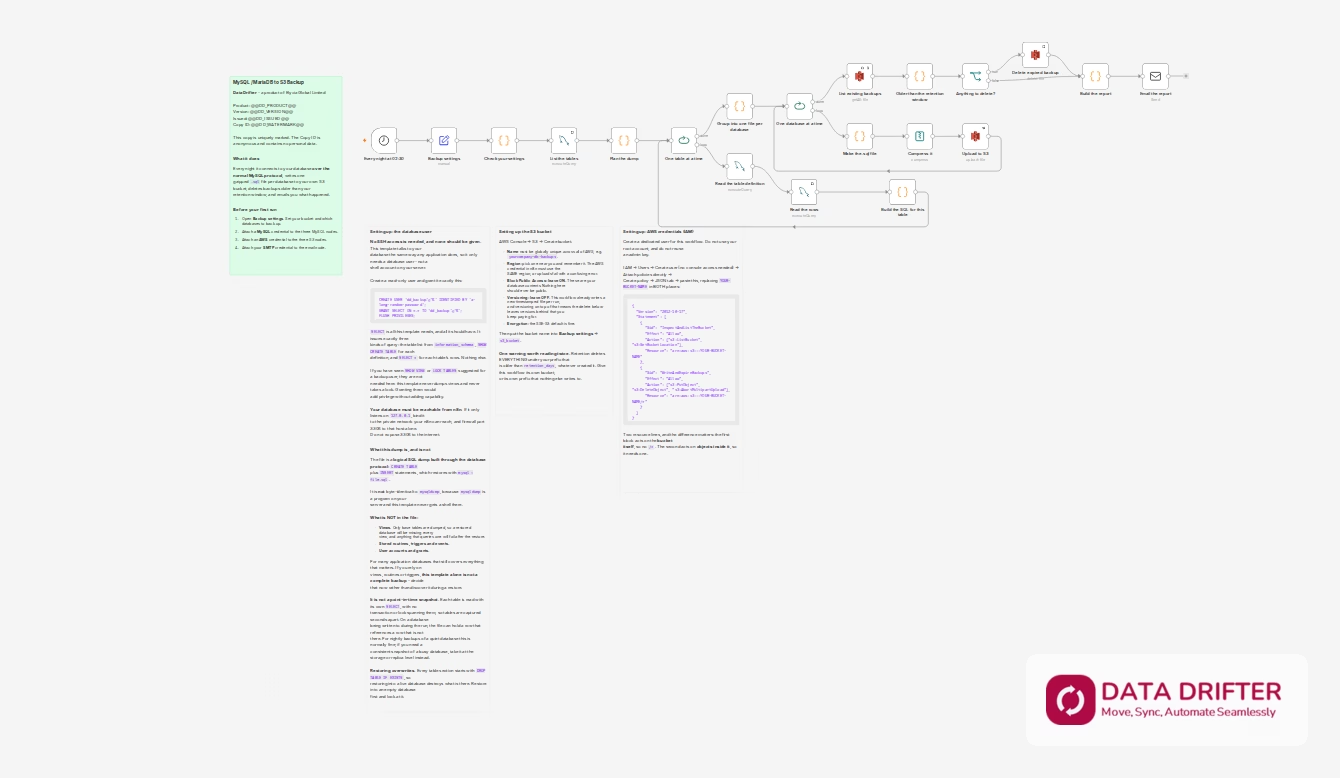
- Nightly trigger. Set to 02:30 by default; change it to whatever suits you.
- Settings check. Your configuration is validated before anything is touched.
- Table discovery. The workflow asks
information_schemawhich base tables exist in the databases you selected. - Table by table. For each, it reads the definition with
SHOW CREATE TABLEand the rows withSELECT *, then buildsCREATE TABLEplusINSERTstatements. - One file per database. The per-table SQL is grouped, written as a
.sqlfile and gzipped. - Upload. Each file goes to your S3 bucket under your prefix.
- Retention. Anything under that prefix older than
retention_daysis deleted. - Report. You get a plain-text email: what was backed up, row and table counts, what was removed by name, and anything that was requested but not found.
Requirements / Prerequisites
- n8n (self-hosted or cloud) that can reach your database on port 3306
- A MySQL 5.7+ or MariaDB 10.x database, reachable from n8n over the network
- A database user with
SELECT– that is the whole grant - An AWS account with an S3 bucket and an IAM user for this workflow
- An SMTP credential for the report email
Your database must be reachable from n8n. If it listens only on 127.0.0.1, bind it to a private network your n8n can reach and firewall port 3306 to that host alone. Do not expose 3306 to the internet.
What’s Included
- The n8n workflow JSON, ready to import
- Four setup notes on the canvas: what it does, the database user, the S3 bucket, and the IAM policy – including a copy-paste least-privilege policy
- A setup guide and this listing
- Your copy is uniquely marked with an anonymous Copy ID containing no personal data
What This Does Not Back Up
Read this section before relying on the template. These are properties of the design, not bugs, and they are stated on the workflow canvas too.
| Not included | Why |
|---|---|
| Views | Only base tables are dumped. A restored database will have no views, and anything querying one will fail |
| Stored routines, triggers, events | Not read by this template |
| User accounts and grants | Not read by this template |
The dump is not a point-in-time snapshot. Each table is read with its own SELECT, with no transaction or lock spanning them, so tables are captured seconds apart. On a database being written to during the run, the file can contain a row that references a row that is not there. For nightly backups of a quiet database this is normally fine. If you need a consistent snapshot of a busy database, take it at the storage or replica level.
Restoring overwrites. Every table section begins DROP TABLE IF EXISTS. Restore into an empty database first and inspect it.
Every row passes through n8n’s memory. This template suits application databases of modest size, not a multi-gigabyte warehouse. max_rows_per_table is the guard, and it fails the run rather than truncating.
Compatibility
| Databases | MySQL 5.7+, MariaDB 10.x |
| n8n | Self-hosted or cloud |
| Storage | Amazon S3 |
| Restore with | gunzip -c file.sql.gz | mysql -u user -p dbname |
| Access needed | Network access to port 3306. No SSH |
FAQ
Do I need SSH access to my database server? No, and you should not give it. The template connects over the MySQL protocol like any application. A read-only database user is all it uses.
Is this the same as mysqldump? No. mysqldump is a program that runs on your server; this template never has a shell there. The output is a logical SQL dump that restores with mysql < file.sql, but it is not byte-identical and it does not include views, routines, triggers, events or grants. See “What This Does Not Back Up”.
What privileges does the database user need? GRANT SELECT ON *.* and nothing else. You may see SHOW VIEW and LOCK TABLES recommended for backup users elsewhere; this template needs neither, because it does not dump views and does not take locks.
Can it back up more than one database? Yes. List them comma-separated, or use * for every database except the MySQL internal ones. Each gets its own file.
What happens if one database is missing? It is named in the report under NOT FOUND, and the others are still backed up.
Will it fill my bucket? No. Anything under your prefix older than retention_days is deleted on each run. Note that this deletes everything under that prefix past its age, whatever wrote it – so give the workflow its own prefix or its own bucket.
Is my copy marked in any way? Yes, and we want you to know that before you download it. Every copy is individually watermarked with an anonymous copy ID such as DD-4KQ2-8ZTV-9M3X, written into a note inside the workflow. It lets us tell copies apart. It contains no personal data – not your name, not your email, not your order number – so a copy you share does not leak anything about you. It is there so that redistribution is attributable, not to identify you to anyone.
How many times can I download it? Your licence allows 10 downloads. There is nothing to activate and no call home from the workflow – an n8n template is a file you import, so a download is the only thing there is to count. Re-downloading to pick up a newer version uses one, which is why the allowance is generous rather than tight.
Are my backups encrypted? They use S3’s default encryption at rest, and the transfer to S3 is over HTTPS. The .sql.gz file itself is not separately encrypted, so treat the bucket as holding your database contents in full: keep Block Public Access on.
Support & Updates
- Free updates for the life of the product
- Support via the DataDrifter support channel
- Issues and requests: contact us through your account
Links & Resources
| Resource | Link |
|---|---|
| Setup guide – MySQL to S3 without SSH | https://datadrifter.io/mysql-backup-s3-without-ssh/ |
| Setup guide – creating the bucket and the IAM policy | https://datadrifter.io/github-backup-s3-bucket-iam-setup/ |
| n8n documentation – importing a workflow | https://docs.n8n.io/workflows/export-import/ |
| MariaDB Knowledge Base – GRANT syntax and privileges | https://mariadb.com/kb/en/grant/ |
| AWS S3 pricing (what a backup costs you) | https://aws.amazon.com/s3/pricing/ |
The setup guide is built into the workflow itself, on the canvas.