Description
WordPress Security Scan – Know Which Vulnerabilities Actually Affect You
Overview
Vulnerability scanners have a credibility problem. Point one at a WordPress site and it returns everything ever recorded against everything you run – one popular form plugin alone has eight entries going back to 2014. If you are on a current version, none of them apply. After a week of that, nobody reads the email, and the one night it matters, nobody reads that either.
WordPress Security Scan is an n8n workflow that asks your site what it is actually running, checks each plugin, theme and (optionally) WordPress core against the WPScan vulnerability database, and reports only the issues that affect the versions you have installed. On a current form plugin it reports nothing, because nothing applies.
It runs on your own n8n with your own WPScan API key and talks to nothing else.
The full setup guide is here: How to Check WordPress Plugins for Known Vulnerabilities With the WPScan API. It covers the application password, the API token header, and the two places a naive version check quietly gives you the wrong answer. You can read it without buying anything.
Key Features
✅ Only what affects your version Every recorded vulnerability is compared against your installed version using a numeric version comparison, not a string one – so 1.10 is correctly newer than 1.9, which a string compare gets backwards. Getting that backwards means either a missed vulnerability or a nightly false alarm.
✅ “Not in the database” is never printed as “clean” Commercial and custom plugins are simply absent from WPScan. A scanner that reports them as clean is inventing a result. This one lists them separately, under a heading that says nothing is known either way.
✅ A broken scan is louder than a clean one If a lookup fails – an expired API token, an exhausted quota – the subject line reads SCAN INCOMPLETE and the email is sent whether or not you asked for findings-only alerts. A security tool that goes quiet when it breaks is worse than no security tool.
✅ Severity you can see the reasoning for Each finding carries a severity band derived from the vulnerability type, and the report says in plain words that the band is ours, not CVSS. The free WPScan tier returns no CVSS score, so none is shown or implied. A vulnerability type the template has not assessed is labelled UNKNOWN, never quietly filed as minor.
✅ It works inside the free API tier instead of pretending the limit is not there The free WPScan tier allows 25 lookups a day and a real site needs more. Rather than failing halfway, it checks the least-recently-checked components first, spends the smaller of your cap and the remaining quota, and tells you how many were deferred. Full coverage arrives over a few nights.
✅ It asks your site, rather than guessing from outside A hardened WordPress hides its version and plugin list on purpose. An outside-in scan silently misses what it cannot see, which is the failure that reads as reassurance.
How It Works
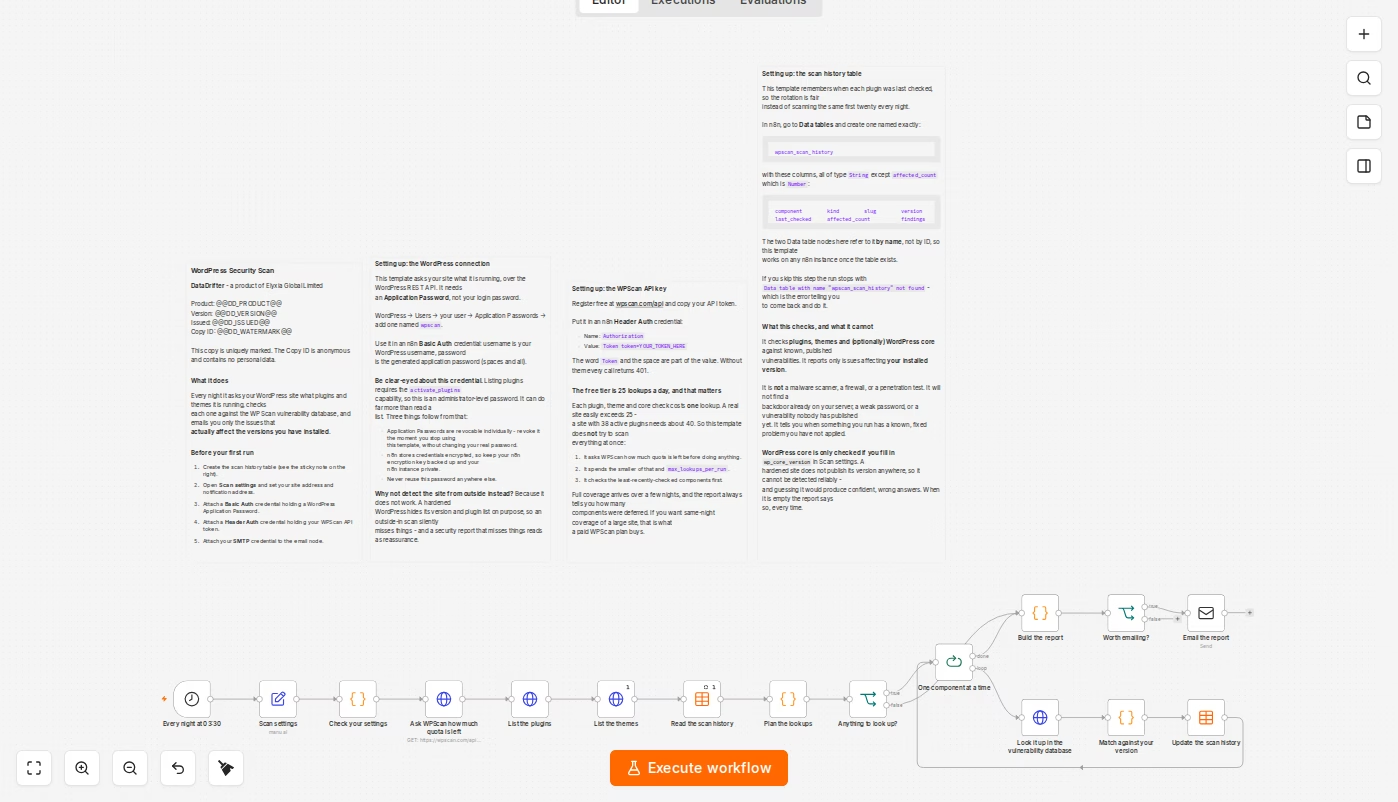
- Nightly trigger. Set to 03:30 by default; change it to whatever suits you.
- Settings check. Your configuration is validated before anything is contacted.
- Quota check. It asks WPScan how many lookups remain before spending any.
- Inventory. It reads your plugin and theme list from your site’s REST API.
- Planning. Active components first, least-recently-checked first, capped by the smaller of your per-run limit and the remaining quota.
- Lookup and match. Each component is checked against the vulnerability database, and every entry is tested against your installed version.
- History. What was checked and when is recorded, so tomorrow picks up where tonight left off.
- Report. A plain-text email: what was found, at what severity, with the version each issue was fixed in and its CVE where WPScan has one – plus what was not checked and why.
Getting Started
- Download it and import it – Your copy is in your DataDrifter account under Downloads. In n8n, open Workflows -> Import from File and pick the JSON. Your licence allows 10 downloads and there is nothing to activate afterwards – see the FAQ for what that means.
- Create the application password – In WordPress, under Users, add an Application Password for an administrator account. Listing plugins requires the
activate_pluginscapability and no lesser role has it. - Get a free WPScan API token – Register at wpscan.com/api. The free tier is 25 lookups per day, which this template is built around.
- Create the scan history table – An n8n Data table named
wpscan_scan_history. The workflow canvas gives you the exact columns. - Fill in the Scan settings node – Your site URL, your email, your per-run lookup cap, and
wp_core_versionif you want core checked too. - Run it once by hand, then let the schedule take over. The first run tells you how much of your site it managed to cover.
Requirements / Prerequisites
- n8n (self-hosted or cloud) that can reach your WordPress site
- A WordPress Application Password. Listing plugins requires the
activate_pluginscapability, so this is an administrator-level credential. See the warning below - A free WPScan API token from wpscan.com/api – 25 lookups per day
- An n8n Data table named
wpscan_scan_history(the workflow canvas gives you the exact columns) - An SMTP credential for the report email
About that application password. It is administrator-level and can do far more than read a list. Application Passwords are revocable one at a time, so revoke it the moment you stop using this template – no need to change your real password. Keep your n8n instance private and its encryption key backed up. Never reuse the password elsewhere. We would rather say this plainly on the listing than bury it in the setup notes.
What’s Included
- The n8n workflow JSON, ready to import
- Four setup notes on the canvas: what it does, the WordPress connection, the WPScan API key and its quota, and the scan history table
- A setup guide and this listing
- Your copy is uniquely marked with an anonymous Copy ID containing no personal data
What This Does Not Tell You
Read this before relying on the template. These are properties of the design, not bugs, and they are stated on the workflow canvas too.
| Not covered | Why |
|---|---|
| Malware already on your server | This is not a malware scanner. It compares versions against published vulnerabilities |
| Weak passwords, misconfiguration, file permissions | Not examined |
| Anything unpublished | It can only report what the vulnerability database knows |
| Commercial and custom plugins | Usually absent from WPScan. Reported as unknown, never as clean |
| WordPress core, unless you tell it your version | A hardened site does not publish its version. Guessing would produce confident wrong answers, so it asks you instead and says so in every report when you have not |
It finds nothing on a fully patched site, and that is the correct answer. If you want a tool that always produces something to look at, this is the wrong one.
Severity bands are ours, not CVSS. The free WPScan tier returns no score. The bands are derived from the vulnerability type, the report says so in every email, and a type we have not assessed is shown as UNKNOWN rather than assumed harmless.
Compatibility
| WordPress | Any version exposing the standard REST API |
| n8n | Self-hosted or cloud. Requires the Data tables feature |
| Vulnerability data | WPScan API v3, free tier (25 lookups/day) or paid |
| Access needed | An administrator Application Password. No SSH, no FTP, nothing installed on your server |
FAQ
Will this slow my site down or change anything? No. It makes two read-only REST API calls per run and writes nothing to your site.
Why does it need an administrator password just to list plugins? Because WordPress requires the activate_plugins capability to read the plugin list. There is no lesser role that can. Use a dedicated, revocable Application Password.
The free tier is 25 lookups a day and I have 40 plugins. Is that a problem? It is a constraint the template is built around rather than one it hits. Least-recently- checked components go first, and each report tells you how many were deferred. Full coverage arrives over a few nights. A paid WPScan plan buys same-night coverage.
Why did it report nothing? Because nothing you run has a published vulnerability affecting your installed version. Check the “not checked this run” section of the same email to see what was deferred or absent from the database.
A plugin I use was not in the database. Is it safe? Unknown – which is exactly what the report says. WPScan does not track most commercial and custom plugins. It is not a clean result and is deliberately not presented as one.
Does it check WordPress core? Only if you fill in wp_core_version in Scan settings, because a hardened site does not publish its version. Every report you receive states whether core was checked.
What happens if my API token expires? The subject line says SCAN INCOMPLETE, the email is sent regardless of your alert preference, and the failing components are named. It will not report a clean scan.
Is my copy marked in any way? Yes, and we want you to know that before you download it. Every copy is individually watermarked with an anonymous copy ID such as DD-4KQ2-8ZTV-9M3X, written into a note inside the workflow. It lets us tell copies apart. It contains no personal data – not your name, not your email, not your order number – so a copy you share does not leak anything about you. It is there so that redistribution is attributable, not to identify you to anyone.
How many times can I download it? Your licence allows 10 downloads. There is nothing to activate and no call home from the workflow – an n8n template is a file you import, so a download is the only thing there is to count. Re-downloading to pick up a newer version uses one, which is why the allowance is generous rather than tight.
Support & Updates
- Free updates for the life of the product
- Support via the DataDrifter support channel
- Issues and requests: contact us through your account
Links & Resources
| Resource | Link |
|---|---|
| Setup guide – checking plugins for known vulnerabilities | https://datadrifter.io/wordpress-plugin-vulnerabilities-wpscan-api/ |
| WPScan API – register for a free token | https://wpscan.com/api/ |
| WordPress documentation – Application Passwords | https://developer.wordpress.org/rest-api/reference/application-passwords/ |
| n8n documentation – importing a workflow | https://docs.n8n.io/workflows/export-import/ |
| n8n documentation – Data tables | https://docs.n8n.io/data/data-tables/ |
The setup guide is built into the workflow itself, on the canvas.