Description
GitHub Repos to S3 Backup – Your Code, In Your Own Bucket, Every Night
Overview
GitHub is where your code lives, but it is not a backup. An accidental force push, a deleted repository, a billing lapse, a compromised account or an organisation you lose access to all end the same way: the code is gone, and the only copy was in someone else’s account. Most small teams discover this on the day it matters.
GitHub Repos to S3 Backup is an n8n workflow that copies every repository you own into an S3 bucket you control, on a schedule you set. It runs on your own n8n instance, uses your own AWS account, and sends you a short report each time it finishes. Nothing passes through a third-party service, because there is no third-party service involved – the workflow talks directly to GitHub and directly to S3.
The full setup guide is here: [How to Back Up GitHub Repositories to Amazon S3: Bucket and IAM Setup](https://datadrifter.io/github-backup-s3-bucket-iam-setup/)
- it walks through creating the bucket and the IAM policy before you import
anything, and you can read it without buying anything.
It is built for the person who already self-hosts. You edit one node, attach three credentials, and leave it alone. The design decisions that matter are the unglamorous ones: repository listing is paginated so a large account is never silently truncated, repositories are processed one at a time so a small n8n box does not run out of memory, and a single unreachable repository is counted and reported rather than being allowed to abandon the rest of the night’s backup.
Key Features
✅ Every repository, not the first hundred Repository listing is paginated. A plain per_page=100 request stops at 100 repositories and gives no indication that it did, which produces a backup that looks successful and is quietly incomplete.
✅ Timestamped, human-readable S3 layout Archives land at prefix/repository-name-YYYYMMDD-HHMMSS.tar.gz. Sorted by name, every copy of a repository sits together, so when you need to restore at 3am you can find the right file by reading the key – no manifest, no lookup.
✅ Automatic retention Set retention_days and the workflow removes archives older than that window on every run, so storage cost stays flat instead of growing forever.
✅ One repository at a time Peak memory is a single archive rather than your entire account at once, which is what makes the template safe to run on a small self-hosted n8n instance.
✅ Failures are counted, not swallowed Download and upload each retry three times before giving up, and a repository that still fails is named in the report. The run continues, because one bad repository is not a reason to skip the other forty-nine.
✅ A report on every run, including the quiet ones Each run emails a success count, a failure count with reasons, the number of old archives removed, and the settings in force. It arrives even when nothing failed and nothing was old enough to delete – a backup you stop hearing from is indistinguishable from a backup that stopped running.
✅ It works out whose repositories to back up Leave the owner blank and it reads your account from your GitHub token. Name an organisation or another user and it looks them up and routes itself. There is no “user or organisation?” setting to get wrong, because there is nothing to answer.
✅ Setup instructions live inside the workflow The AWS permissions policy is there to copy and paste, alongside how to create the bucket and the GitHub token. You do not need to leave the canvas to find out what s3:ListBucket wants, or why dropping s3:DeleteObject quietly breaks retention.
✅ Your bucket, your credentials, your data The workflow runs entirely on your n8n instance against your AWS account. There is no DataDrifter service in the path and nothing to sign up for.
How It Works
- Download it and import it – Your copy is in your DataDrifter account under Downloads. In n8n, open Workflows -> Import from File and pick the JSON. Your licence allows 10 downloads and there is nothing to activate afterwards – see the FAQ for what that means.
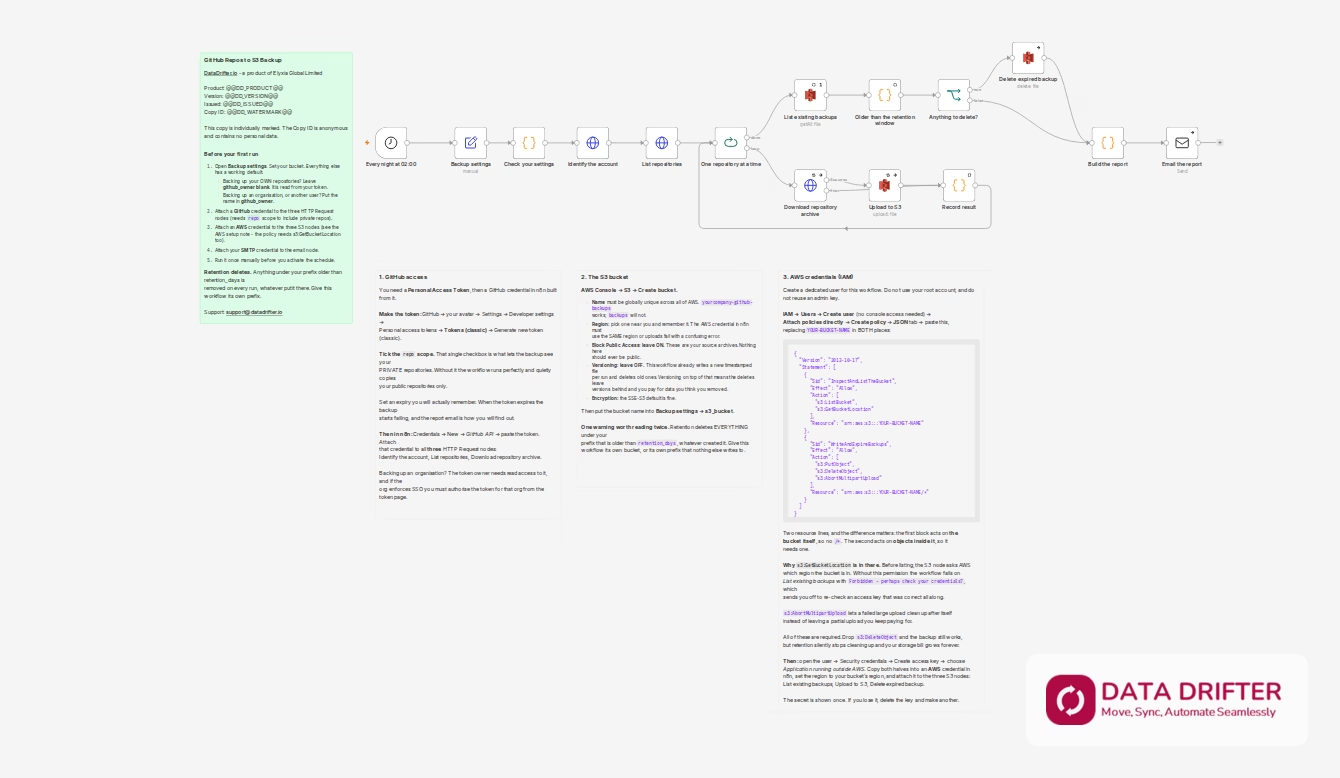
- Set your bucket – Open the single Backup settings node. In the common case you fill in two things: your S3 bucket and where the report should go. Leave github_owner blank to back up your own account – the workflow reads that from your token. Everything else already has a working default.
- Attach your credentials – A GitHub credential on the three HTTP Request nodes, an AWS credential on the three S3 nodes, and your SMTP credential on the email node.
- Run it once by hand – Confirm the archives appear in your bucket and the report arrives, before you let it run unattended.
- Leave it running – On schedule (nightly at 02:00 by default), it lists your repositories, archives each one to S3, clears anything past the retention window, and emails you the result.
Requirements / Prerequisites
- n8n – built and validated on n8n 2.33.7 (self-hosted or cloud). Older versions are untested; the workflow uses Set v3.4, HTTP Request v4.2, Split In Batches v3, AWS S3 v2, Code v2 and Send Email v2.1 nodes.
- A GitHub credential with the
reposcope. Thereposcope is what includes private repositories; without it you will back up public ones only. - An AWS account and an S3 bucket you can write to.
- AWS permissions on that bucket:
s3:ListBucket,s3:GetBucketLocation,s3:PutObject,s3:DeleteObjectands3:AbortMultipartUpload. The exact policy is included in the workflow, ready to paste.s3:GetBucketLocationis needed before any listing happens, ands3:DeleteObjectis what the retention step uses – omit it and backups accumulate and are never cleaned up. - An SMTP credential for the report email.
notify_fromis optional – leave it blank and the report is sent fromnotify_email. Whichever address is used must be one your SMTP server is permitted to send as. - Enough S3 storage for your repositories multiplied by the number of runs inside your retention window.
What’s Included
- The n8n workflow JSON file, ready to import
- Setup notes built into the workflow covering all three credentials: creating the GitHub token and the scope it needs, creating the S3 bucket, and a copy-paste IAM policy granting exactly the permissions required, no more
- An About this template note covering first-run setup
- Per-node documentation notes explaining what each step does and why
- This listing, which doubles as the setup guide
Compatibility
| Item | Supported |
|---|---|
| n8n | Built and validated on 2.33.7. Older versions untested |
| n8n hosting | Self-hosted and n8n Cloud |
| GitHub account type | Personal user accounts and organisations, detected automatically |
| Repository visibility | Public and private (private requires the repo scope) |
| Object storage | AWS S3 |
| Archive format | .tar.gz (GitHub source tarball) |
FAQ
Q: Does this back up my full git history? A: No, and this is the most important thing to understand before you rely on it. GitHub’s archive endpoint returns the working tree at your repository’s default branch – the files as they currently stand. It does not include commit history, other branches, tags, issues, pull requests, releases, or the wiki. It answers “I need the code back”, not “I need the repository back exactly as it was”. If you need history, you want a mirror clone, which this template does not do.
Q: What happens if one repository fails? A: It is retried three times, and if it still fails the run carries on to the next repository. The failure is counted and the reason is included in the report email, so a partial backup is always visible as a partial backup.
Q: Will the retention step delete things I did not intend? A: It deletes every object under your configured s3_prefix that is older than retention_days, and it does not check whether this workflow created it. Give the workflow its own prefix, or its own bucket. Do not point s3_prefix at a location that holds anything else.
Q: Does it back up repositories I contribute to but do not own? A: No. It backs up repositories owned by the account or organisation being backed up. Repositories where you are only a collaborator are not included.
Q: Can I back up someone else’s account, or another organisation? A: An organisation, yes – put its name in github_owner. Another individual’s account, only their public repositories: GitHub does not expose one person’s private repositories to another person’s token, no matter how the token is scoped. When that happens the report says so explicitly rather than letting a half-complete backup look finished. To include your own private repositories, leave github_owner blank.
Q: How much will the S3 storage cost? A: That depends on your repository sizes and retention window, and S3 pricing is per region, so check AWS’s current rates. The retention setting is the control: lowering retention_days lowers cost directly.
Q: Is my copy marked in any way? A: Yes, and we want you to know that before you download it. Every copy is individually watermarked with an anonymous copy ID such as DD-4KQ2-8ZTV-9M3X, written into a note inside the workflow. It lets us tell copies apart. It contains no personal data – not your name, not your email, not your order number – so a copy you share does not leak anything about you. It is there so that redistribution is attributable, not to identify you to anyone.
Q: How many times can I download it? A: Your licence allows 10 downloads. There is nothing to activate and no call home from the workflow – an n8n template is a file you import, so a download is the only thing there is to count. Re-downloading to pick up a newer version uses one, which is why the allowance is generous rather than tight.
Q: What does this cost, and what is the licence? A: The template is free. You are free to use and modify it inside your own organisation.
Support & Updates
Support is by email at [email protected], with a 48-hour response target. If something is not working, include your n8n version, which node failed, and the error text from the n8n execution log – that is almost always enough to identify the problem. Because this is a free template the support target is best-effort rather than a guarantee. Updates covering n8n node changes are published to the same listing at no cost.
Links & Resources
| Resource | Link |
|---|---|
| AWS IAM and bucket setup guide | https://datadrifter.io/github-backup-s3-bucket-iam-setup/ |
| n8n documentation – importing a workflow | https://docs.n8n.io/workflows/export-import/ |
| GitHub REST API – repository archives | https://docs.github.com/en/rest/repos/contents |
| AWS S3 pricing (what a backup costs you) | https://aws.amazon.com/s3/pricing/ |